
From Clomosy Docs
(Created page with " function Trim(const Text String):String; The Trim function removes blank and control characters (such as line feed) from the start and end of a string.<br> Use '''TrimLeft''' or '''TrimRight''' to limit the operation to just one end of the string.<br> '''Example:'''<br> '''const''' textValue = ' Text ';<br> '''begin'''<br> ShowMessage('/'+TrimLeft(textValue)+'/'); ShowMessage('/'+TrimRight(textValue)+'/'); ShowMessage('/'+Trim(textValue)+'/');<...") |
No edit summary |
||
| Line 7: | Line 7: | ||
'''Example:'''<br> | '''Example:'''<br> | ||
'''const''' | '''const''' | ||
textValue = ' | textValue = ' Letters ';<br> | ||
'''begin'''<br> | '''begin'''<br> | ||
ShowMessage('/'+TrimLeft(textValue)+'/'); | ShowMessage('/'+TrimLeft(textValue)+'/'); | ||
Revision as of 10:07, 8 January 2024
function Trim(const Text String):String;
The Trim function removes blank and control characters (such as line feed) from the start and end of a string.
Use TrimLeft or TrimRight to limit the operation to just one end of the string.
Example:
const
  textValue = '      Letters     ';

begin

  ShowMessage('/'+TrimLeft(textValue)+'/');
  ShowMessage('/'+TrimRight(textValue)+'/');
  ShowMessage('/'+Trim(textValue)+'/');

end;
Output:

TrimLeft Screen

TrimRight Screen
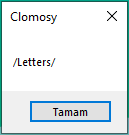
Trim Screen


